I woke up this morning wanting to build something fun. By tonight, I had a fully animated desktop cat living on my screen, walking around, playing with yarn, dancing, sleeping, and meowing at me when I dragged it around.
Total development time: about 12 hours. Lines of code I wrote manually: close to zero.
Here’s how I did it, and what I learned about using AI tools for a complete build-ship-deploy cycle.
The Idea
Desktop pets were huge in the late ’90s and early 2000s. Remember Bonzi Buddy? Or those little sheep that walked across your screen? I wanted to bring that nostalgia back, but with modern tech and way cuter art.
The plan was simple:
- Electron for the desktop app shell (transparent, frameless window)
- Canvas 2D for rendering sprites with green-screen removal
- AI-generated art for all the character assets
- AI coding assistant for all the logic
Tool #1: Google Antigravity (The Coding Brain)
Google Antigravity is Google DeepMind’s agentic AI coding assistant. Think of it like Cursor or Claude Code, but built on Gemini models with deep IDE integration. I used it as my pair programmer for the entire project.
What it handled:
- Complete Electron app scaffolding (
main.js,preload.js, IPC bridges) - CSS-based mouse passthrough (so clicks go through the transparent window to your desktop)
- A full state machine with 8 states: idle, walking, sleeping, happy, eating, playing, dancing, and dragging
- Physics simulation for gravity drop + bounce when you drag and release the pet
- Green-screen removal algorithm (pixel-by-pixel Canvas processing)
- Multi-resolution screen boundary detection
- GitHub Actions CI/CD for cross-platform builds
What impressed me: I described what I wanted in plain language, and Antigravity handled the entire architecture. When I ran into a nasty Windows DWM bug where the title bar kept flickering back on transparent windows, it systematically debugged through multiple approaches — setIgnoreMouseEvents, setBounds workarounds, and finally landed on app.disableHardwareAcceleration() as the fix. That kind of iterative debugging is where AI coding assistants really shine.
Where it struggled: Some Windows-specific Electron quirks needed multiple iterations. The DWM title bar ghost took about 4 rounds of fixes before we nailed it. But honestly, I would’ve spent way longer figuring that out on my own.
Tool #2: Nano Banana (The Art Department)
This is where things got really fun. Nano Banana is an AI image generation tool that excels at consistent character design across multiple poses.
I needed 19 individual sprite frames, all featuring the same character, in different poses and expressions. That’s traditionally a nightmare for AI image generation because maintaining character consistency across prompts is hard.
My approach:
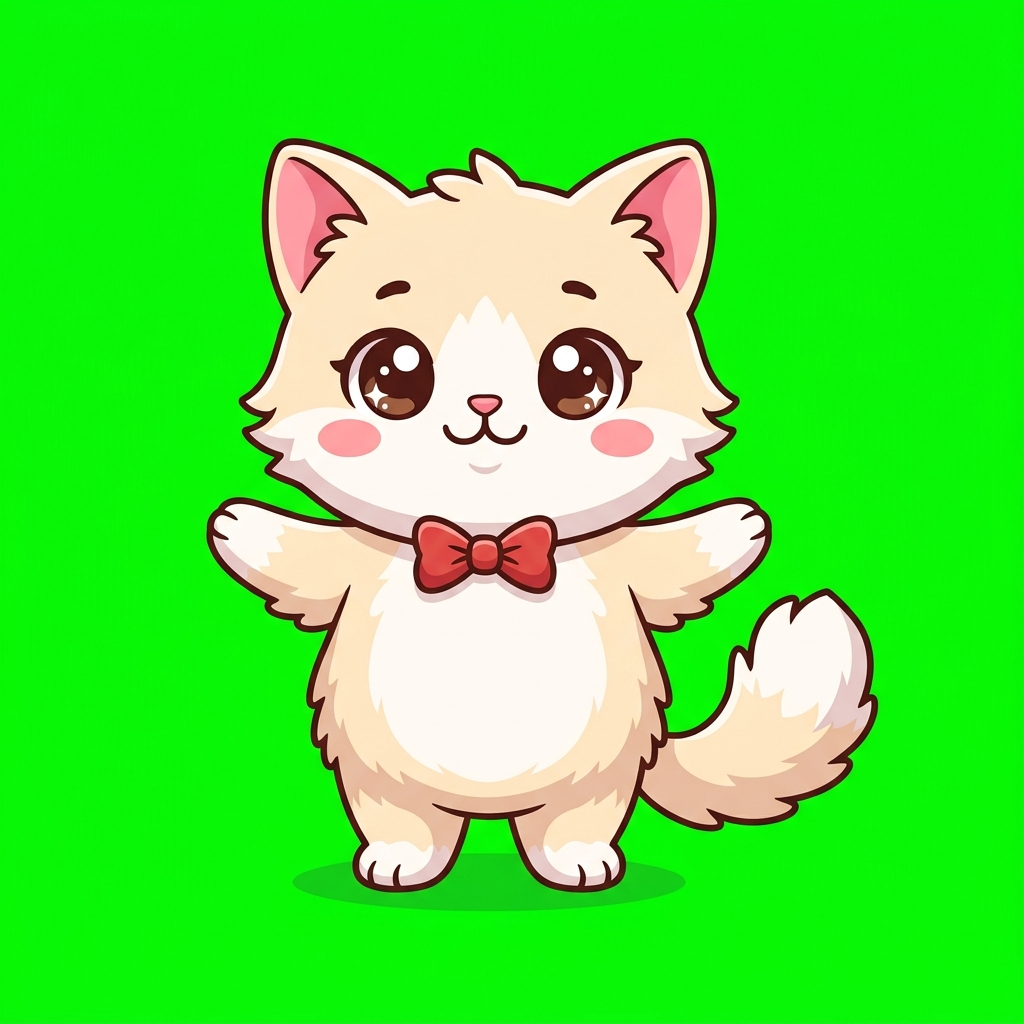
- Antigravity generated detailed prompts for each pose, with explicit character descriptions (cream/beige chibi cat, red bow tie, big brown eyes, pink cheeks)
- Every prompt specified a pure green (#00FF00) background for programmatic removal
- I fed each prompt into Nano Banana one by one
The full sprite set:
| State | Frames | Description |
|---|---|---|
| 🧍 Idle | 1 | Front-facing, standing with paws at sides |
| 🚶 Walk | 4 | Side-view walking cycle (mirrored for right) |
| 😊 Happy | 1 | Eyes as crescents, blushing, heart particles |
| 🐟 Eat | 2 | Holding fish → chomping fish |
| 🧶 Play | 4 | Crouch → paw swipe → hug yarn → tangled in yarn |
| 💤 Sleep | 2 | Curled up breathing cycle |
| 💃 Dance | 3 | Left pose → hands up → right pose |
| 😱 Drag | 1 | Startled expression, limbs spread |
Character consistency was surprisingly good. Across all 19 frames, the cat maintained its cream color, red bow tie, and overall proportions. A few frames needed minor prompt tweaking, but nothing major.
The Technical Deep Dive
Green Screen Removal in JavaScript
Every sprite comes with a bright green background. Rather than manually editing 19 images in Photoshop, I wrote (well, Antigravity wrote) a real-time green-screen removal algorithm:
// For each pixel, calculate "greenness" ratio
const greenness = (g - Math.max(r, b)) / g;
if (greenness > 0.15) {
  // Fade alpha based on green intensity
  const alpha = Math.max(0, 1 - greenness * 2.2);
  data[i + 3] = Math.round(alpha * 255);
}
This runs at load time on every sprite. The result? Perfectly transparent characters with smooth edges, no manual work needed.
The Click-Through Problem
A desktop pet needs to be non-intrusive. You should be able to click through the transparent areas to interact with whatever’s behind it. Electron’s setIgnoreMouseEvents API seems like the obvious solution, but on Windows it triggers DWM to redraw the non-client area (title bar) every time you toggle it.
The fix was pure CSS:
body { pointer-events: none; }      /* Everything passes through */
#pet { pointer-events: auto; }      /* Except the pet itself */
#context-menu { pointer-events: auto; } /* And the right-click menu */
No IPC calls, no flickering, no DWM ghosts. Sometimes the simplest solution is the best one.
Multi-Resolution Safety
A friend tested an early build and the cat fell off the bottom of their 768p laptop screen. The pet was calculating boundaries based on a hardcoded 1080p assumption.
The fix involved switching from workAreaSize (just dimensions) to workArea (dimensions + offset), which accounts for taskbar position. Plus a safety timer that checks every 5 seconds:
startSafetyCheck() {
setInterval(() => {
if (this.isDragging) return;
if (this.ensureInBounds()) {
this.setState('idle');
this.showBubble('Almost got lost! 😮💨');
}
}, 5000);
}From Code to Release in Minutes
Once the code was solid, Antigravity set up a GitHub Actions workflow that builds for all three platforms on every tagged release:
git tag v1.0.0
git push origin v1.0.0
# 3 minutes later: Windows, macOS, and Linux builds on GitHub Releases
The workflow runs three parallel jobs (Windows, macOS, Linux), each building the appropriate package format:
- Windows: NSIS installer + portable EXE
- macOS: DMG for both Intel and Apple Silicon
- Linux: AppImage + .deb package
All automated. Push a tag, get six downloadable files.
What I’d Do Differently
- Start with spritesheets, not individual files. Loading 19 separate PNGs at startup is slow. A proper spritesheet with a texture atlas would be better.
- Use pre-multiplied alpha instead of runtime green removal. The Canvas pixel manipulation works but adds ~2 seconds to startup.
- Add sound effects. A little “meow” when you pet it would make it 10x more delightful.
- Build a settings panel. Walking speed, size, custom dialogue — all hardcoded right now.
The AI Workflow That Actually Worked
Here’s what made this project flow smoothly:
- Antigravity for architecture — It understood the full Electron + Canvas stack and made sound architectural decisions
- Nano Banana for assets — Consistent character design across 19 poses with green-screen backgrounds
- Antigravity for debugging — The Windows DWM issues would have taken me hours alone
- Antigravity for DevOps — GitHub repo creation, Actions workflow, and release management, all from the terminal
The total AI cost for this project was essentially zero (Antigravity is included in my existing subscription, Nano Banana has a free tier). The total human effort was mostly creative direction: deciding what the cat should look like, what actions to include, and testing the feel of the interactions.
Try It Yourself
The project is fully open source:
🐱 GitHub: github.com/booleamu/DesktopPet
📥 Download: Pre-built packages for Windows, macOS, and Linux are available on the Releases page.
Want to customize the cat? Just replace the PNGs in the assets/ folder with your own character (512×512, green background). The green-screen removal handles the rest.
Built in a single day. Powered by Google Antigravity + Nano Banana. Zero regrets about the lost productivity.
Related: Best AI Tools I Actually Use | Cursor vs Claude Code vs Windsurf
Comments
Sign in with GitHub to leave a comment. Your feedback is appreciated!